
Table of Contents
- The Functional Requirements
- The Three Architectural Layers
- Designing the Entity Schema
- Keeping the Catalog Current: Automated Ingestion
- Entity Validation and Schema Enforcement
- What a Complete Service Template Contains
- Template Implementation
- Enforcing Golden Path Adoption Without Mandating It
- The Provisioning Architecture
- Integrating with IaC
- Policy-as-Code Integration
- Build vs. Buy vs. Extend
- Instrumentation: What to Measure
- The Feedback Loop Architecture
- The RBAC Model
- Compliance Automation
- The Portal as a Product
- Measuring Platform Engineering ROI
This guide covers the architecture, tooling decisions, and implementation patterns behind effective internal developer portals.
What Is a Developer Portal
The term 'developer portal' is used loosely. A wiki with service links is called a portal. A Backstage instance with two plugins and no catalog data is called a portal. A Confluence space with runbook templates is called a portal. None of these is wrong, but none of them is what a mature internal developer portal actually is.
A production-grade IDP is an active runtime system, not a documentation site. It aggregates live metadata from your infrastructure, CI/CD systems, version control, and on-call tooling; exposes that metadata through a structured API; and renders it in a unified interface that lets engineers discover services, understand ownership, initiate workflows, and follow standardized paths without leaving the portal.
The Functional Requirements
Before evaluating tooling or writing code, map out the functional requirements your portal must satisfy. These fall into four categories:
Capability Area | What It Actually Means | Example Signal That It's Missing |
|---|---|---|
Service Discovery | Engineers can find any service, understand its purpose, dependencies, owner, and operational status in under 60 seconds | New hire asks Slack 'who owns the payment service?' |
Ownership Resolution | Every service, pipeline, and data store has a deterministic owner not 'the platform team' or 'ask Bob' | Incident post-mortems list 'unclear ownership' as a contributing factor |
Self-Service Provisioning | Standard infrastructure requests (new service, cloud bucket, DB, pipeline) are fulfilled without a ticket | The platform team's backlog contains >20% boilerplate provisioning tickets |
Golden Path Enforcement | New services start from approved templates with observability, IAM, and CI/CD pre-wired | Each team has a different Dockerfile, a different monitoring setup, different deploy process |
Documentation Freshness | Docs are generated or validated against source not manually maintained | README says 'runs on port 8080', service runs on 3000 |
Audit and Compliance | You can answer 'which services use library X at version Y?' or 'which teams have no on-call rotation?' instantly | Compliance questionnaires are answered by pinging team leads on Slack |
The Three Architectural Layers
A well-designed IDP has three distinct layers. Conflating them is the most common cause of portal sprawl: teams add features to the wrong layer and end up with an unmaintainable monolith.
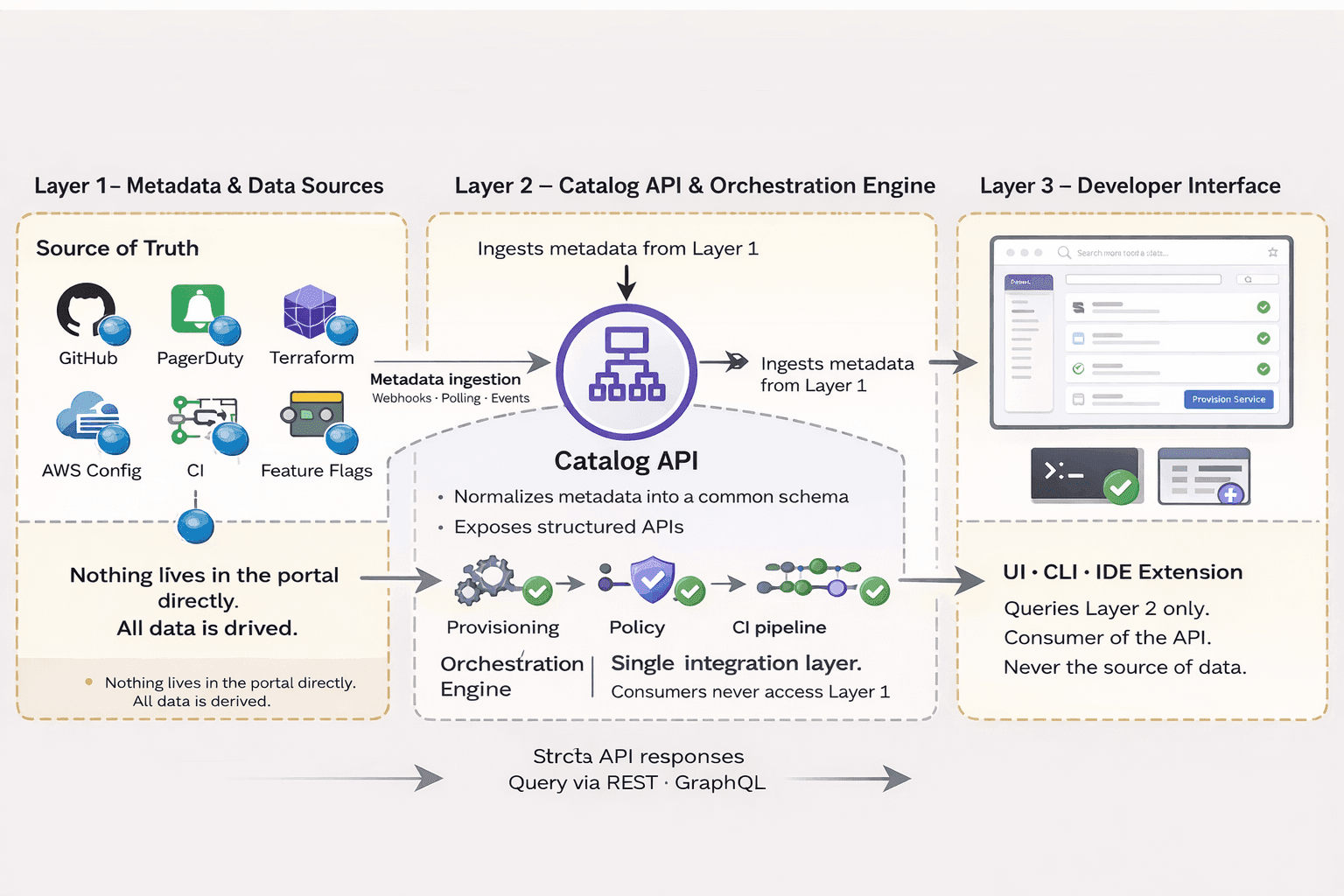
Layer 1 - Metadata & Data Sources: This is your source of truth. GitHub, PagerDuty, Terraform state, AWS Config, your CI system, your feature flag service. Nothing lives in the portal directly; everything is derived.
Layer 2 - The Catalog API & Orchestration Engine: A structured API layer that ingests metadata from Layer 1, normalizes it into a common schema, and exposes it to consumers. This is also where workflow orchestration lives, triggering provisioning, enforcing policy, and initiating pipelines.
Layer 3 - The Developer Interface: The UI (and optionally a CLI or IDE extension) that engineers actually use. It queries Layer 2, not Layer 1 directly. The UI is a consumer of the API, not the source of data.
Why This Matters If your portal stores service metadata in a database that lives only inside the portal, you have a data silo, not an integration layer. When engineers update infrastructure outside the portal (which they will), your catalog immediately drifts. Layer 1 must always be the source of truth; the portal reads from it, not the other way around. |
Schema Design and Metadata Strategy
The service catalog is the foundational capability of any IDP. Everything else, golden paths, self-service provisioning, dependency analysis, and compliance reporting depend on the catalog being accurate, complete, and machine-readable. Most portal implementations get the catalog wrong in the same two ways: they under-specify the schema (resulting in inconsistent metadata), or they make it manually maintained (resulting in stale data)
Designing the Entity Schema
Your catalog schema defines what can be expressed about services and their relationships. Start from what questions you need to answer operationally, not from what's easy to collect. A service entry in a mature catalog should minimally encode:
# catalog-info.yaml (Backstage-compatible, extended) apiVersion: backstage.io/v1alpha1 kind: Component metadata: name: payments-service title: Payments Service description: Handles checkout, refund, and subscription billing flows annotations: github.com/project-slug: acme/payments-service pagerduty.com/service-id: P1A2B3C argocd/app-name: payments-service-prod sonarqube.org/project-key: acme_payments backstage.io/techdocs-ref: dir:. tags: - payments - pci-scoped - java links: - url: https://grafana.acme.internal/d/payments title: Grafana Dashboard icon: dashboard - url: https://acme.pagerduty.com/services/P1A2B3C title: PagerDuty icon: alert spec: type: service lifecycle: production # experimental | deprecated | production owner: team:payments-team system: checkout-platform dependsOn: - component:fraud-service - resource:payments-postgres - api:stripe-v3 providesApis: - payments-api-v2 |
Several design decisions in the above schema deserve explanation:
The annotations block is where third-party integrations attach. Each annotation key follows a namespaced convention (tool.provider/key) this prevents collisions and makes it clear which plugin owns which annotation.
The lifecycle field drives filtering in the catalog and gates automated processes. Services in experimental may be exempt from certain policy checks; deprecated services trigger sunset workflows.
dependsOn uses typed references (component:, resource:, api:) rather than plain strings. This allows the catalog to build a typed dependency graph, not just a list of names.
The system field groups services into logical domains, enabling you to answer questions like 'what is the blast radius if the checkout-platform system has an outage?'
Keeping the Catalog Current: Automated Ingestion
Manual catalog maintenance fails at scale. Ownership changes, services are created and deprecated, and annotations drift. The only sustainable approach is automated ingestion; the catalog pulls from source systems rather than relying on engineers to push updates.
Source System | What to Ingest | Ingestion Method | Freshness Target |
|---|---|---|---|
GitHub / GitLab | catalog-info.yaml files; repository metadata; code owners | Webhook on push events + periodic full scan | < 5 min on change |
Terraform / Pulumi state | Cloud resources, their types, regions, and owning workspace | State file parsing via CI pipeline artifact | Per deployment |
PagerDuty | Service definitions, on-call schedules, and incident history | PagerDuty API polled every 15 min | < 15 min |
ArgoCD / FluxCD | Deployment targets, sync status, current image digest | CD system webhook / API poll | < 2 min on sync |
AWS Config / GCP Asset Inventory | Actual deployed resources vs. declared resources | Config snapshots via EventBridge / Pub/Sub | < 10 min |
Dependabot / Snyk | Vulnerable dependency alerts per service | Webhook on alert creation | Real-time |
The Ingestion Pipeline Pattern
Each source system feeds into a normalizer that transforms raw API responses into catalog entities. The normalizer should be stateless, given the same raw input, it always produces the same catalog entity. This makes ingestion idempotent and debuggable.
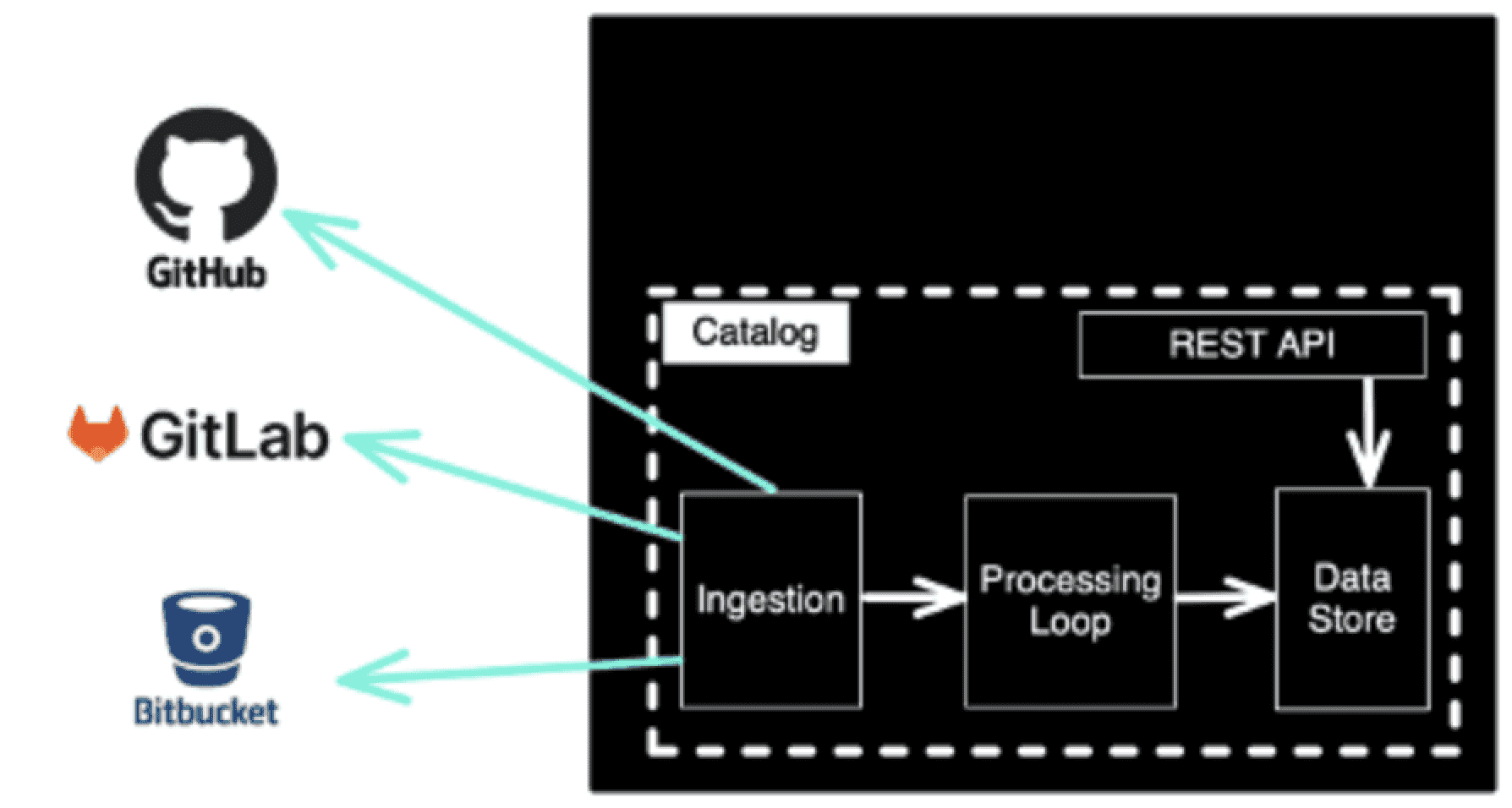
Conflict Resolution Strategy When two source systems provide conflicting values for the same field (e.g., GitHub says team A owns a service, PagerDuty says team B), you need a declared precedence chain. Define it explicitly: for ownership, prefer catalog-info.yaml over CODEOWNERS over PagerDuty. Document this in your schema specification so engineers know which system to update to effect a real change. |
Entity Validation and Schema Enforcement
Catalog data quality degrades without enforcement. Implement validation at ingestion time, not as a best-effort lint check, but as a gate that determines whether an entity is published or held in a quarantine state.
Entities that fail validation are published in a quarantined state visible in the catalog with a 'Health: Degraded' badge and flagged to the owning team via an automated notification. They remain discoverable but are excluded from compliance reports and automated processes until fixed.
Scaffolding, Templates, and Enforcement
The term 'golden path' is borrowed from the idea of the paved road, a route that is clearly marked, well-maintained, and the obvious way to travel. In platform engineering, a golden path is a template-driven workflow that produces a correctly configured starting point for any common engineering task: a new microservice, a data pipeline, a scheduled job, or a frontend application.
The goal is not to restrict engineers; it is to make the correct approach the default approach. Golden paths eliminate the 40 decisions a new service requires (what base image? what logging library? how to wire Prometheus metrics? which IAM pattern?) by making those decisions once, at the platform level, and encoding them into a scaffolding template.
What a Complete Service Template Contains
Template Component | What It Provides | Why It Cannot Be Optional |
|---|---|---|
Base Dockerfile / Build Config | Approved base image, multi-stage build, non-root user, COPY vs ADD correctness | Image sprawl and CVE exposure from unmaintained base images |
Observability Bootstrap | Prometheus metrics endpoint, structured log format, trace context propagation | Services without this become blind spots in your observability stack |
CI Pipeline Skeleton | Lint, test, SAST scan, image build, push, deploy stages pre-wired | Teams skip security scanning when it isn't pre-configured |
IAM / Service Identity | Service account with least-privilege, Vault/AWS IRSA wiring | Services request admin credentials because the correct pattern requires effort |
Health & Readiness Probes | Kubernetes liveness/readiness endpoints pre-implemented | Services fail silently or cause rolling deployment failures |
catalog-info.yaml | Pre-populated catalog entry with correct schema | Services never make it into the catalog if registration requires manual effort |
README Template | Architecture decision record placeholder, runbook stub, on-call section | Documentation is never written retroactively |
Template Implementation
The scaffolding tool determines how much flexibility engineers have to deviate from the template, and how easy it is to update templates over time. The three mainstream approaches have meaningfully different tradeoffs:
Tool | Template Language | Portal Integration | Post-Scaffold Updates | Best For |
|---|---|---|---|---|
Cookiecutter | Jinja2 + JSON config | Via API / Backstage plugin | Manual (no link to template after scaffold) | Simple, language-agnostic scaffolding |
Yeoman | JavaScript generators | Custom integration required | Limited generator version can be re-run | Complex multi-file projects with conditional logic |
Backstage Software Templates | YAML + Nunjucks actions | Native | No one-time scaffold | Orgs already running Backstage |
Copier | Jinja2 + YAML | Via API | Excellent design for ongoing updates | Orgs that want to push template updates to existing services |
Template Drift: The Silent Problem Scaffolding tools produce a snapshot of the template at creation time. If your base image is updated, a new security annotation is required, or your CI pipeline changes, services created from old templates don't automatically receive those changes. Copier is the only mainstream tool designed to solve this it maintains a link between the generated project and the template, enabling future updates to be applied like patches. If you use any other tool, you need an explicit strategy for propagating template changes to existing services (typically: automated PRs via a fleet management script). |
Enforcing Golden Path Adoption Without Mandating It
Mandating golden paths generates resistance. A more effective strategy is making the golden path the path of least resistance and making deviation visible, not blocked. The scorecard approach works because it creates social incentive (team leads see scores in weekly reports) and provides a clear, actionable path (each failing check links to the golden path that addresses it). Services with low scores are not blocked from deploying, but they are flagged in compliance reports and excluded from internal 'excellent engineering' recognition programs.
Self-Service Provisioning
Self-service provisioning is where portals move from being information systems to being operational systems. The distinction matters architecturally: an information system renders data; an operational system executes changes in infrastructure with real side effects.
This creates an implementation challenge that many portal projects underestimate: provisioning workflows must be reliable, auditable, idempotent, and recoverable. A failed wiki page is an inconvenience. A half-completed database provisioning request that leaves orphaned resources and an inconsistent state is an incident.
The Provisioning Architecture
Key architectural decisions in the provisioning layer:
Async by default: Provisioning requests should be queued and processed asynchronously. Never make the portal UI wait on a synchronous Terraform run. Return a request ID immediately, poll for status, and notify on completion.
Idempotency everywhere: Every provisioning operation must be safe to retry. If the worker crashes mid-execution, re-running the same request should produce the same result, not duplicate resources.
Blast radius isolation: Provision in isolated workspaces. A failed request for team A should never affect resources owned by team B. Use separate Terraform workspaces, separate state files, and separate IAM roles per provisioning scope.
Explicit audit trail: Every provisioning request, including who requested it, when, what parameters were used, and what was created, must be logged to an immutable audit store, not just application logs.
Integrating with IaC
IaC Tool | Portal Integration Pattern | State Management | Key Tradeoff |
|---|---|---|---|
Terraform | Portal invokes Terraform CLI via worker process; uses remote state (S3 + DynamoDB lock) | Remote state in S3; lock table in DynamoDB | Mature ecosystem, HCL templating can be complex for portal-driven parameterization |
Pulumi | Portal calls Pulumi Automation API (Go/Python/TS SDK) directly — no CLI subprocess | Pulumi Cloud or self-hosted backend | Full programming language = more flexibility; steeper learning curve for IaC authors |
Crossplane | Portal submits Kubernetes CRDs; Crossplane controller reconciles to cloud state | Kubernetes etcd cloud resources are reconciled continuously | Excellent for GitOps-native orgs; requires Kubernetes as a control plane dependency |
CDK / Terraform CDK | Synthesize CloudFormation/TF config programmatically; execute via standard runners | Standard per-tool backends | Good for teams already using CDK; synthesized output can be verbose and hard to diff |
The Pulumi Automation API If you're building a provisioning layer from scratch, the Pulumi Automation API deserves serious consideration. It exposes the full Pulumi runtime as an embeddable library your provisioning worker calls it as a function in the same process, rather than spawning a subprocess. This means structured error handling, proper stack management, and detailed output capture without shell scripting gymnastics. The tradeoff is that your provisioning worker must be written in a language Pulumi supports (Go, Python, TypeScript, .NET, Java). |
Policy-as-Code Integration
Every provisioning request should pass through a policy evaluation layer before execution. This is where guardrails live, not in the UI (which can be bypassed), not in code review (which is after the fact), but in a machine-evaluated policy engine that runs at provisioning time.
Plugin Architecture and Integrations
A developer portal that can only display its built-in capabilities will stagnate. The ecosystem of tools an engineering organization uses changes continuously new monitoring vendors, new feature flag services, new secrets managers. The portal's integration model determines whether it can absorb these changes incrementally or requires re-architecting every time a new tool is adopted.
Build vs. Buy vs. Extend
Most organizations facing the portal build-buy-extend decision frame it as a technical question. It is primarily an organizational capacity question. The relevant variables are: how much you are willing to own and maintain, how much flexibility you need, and how quickly you need to deliver value.
Factor | Build Custom | Extend Backstage / Open Source | Buy Commercial (Cortex, Port, OpsLevel) |
|---|---|---|---|
Catalog schema control | Full control | Full control via custom entity kinds | Limited to vendor schema; extensible via custom fields |
Plugin ecosystem | You build everything | Large community plugin library (200+ plugins) | Curated integrations; faster to set up, fewer edge cases |
Hosting & ops burden | Full ownership | Self-hosted; your team owns upgrades, scaling, and reliability | Vendor-managed; your team owns configuration |
Time to first catalog data | Months | Days to weeks | Hours to days |
Total engineering cost (Year 1) | High full build | Medium integration and customization | Low engineering, higher licensing |
Suitable org size | 1000+ engineers with a dedicated platform team | 100–1000 engineers with 2–4 platform engineers | Any size, especially 50–200 engineers |
Adoption Engineering
The most common cause of failed developer portal initiatives is not bad technical architecture. It has low adoption. A portal that engineers route around, checking Slack instead of the catalog, filing Jira tickets instead of using self-service, delivers no value regardless of how well it is built.
Adoption engineering is the discipline of designing a portal that becomes indispensable through use. It requires instrumenting the portal to understand how it is actually used, creating feedback loops that surface the most impactful improvements, and treating adoption as a first-class metric.
Instrumentation: What to Measure
Metric | What It Signals | How to Collect | Target / Benchmark |
|---|---|---|---|
Weekly Active Users (WAU) | Basic adoption depth | Page view analytics (e.g., PostHog, Amplitude, or Backstage's analytics API) | Trend: +10% MoM for first 6 months |
Search success rate | Whether engineers find what they're looking for | Track searches with zero results; track searches followed by navigation vs. abandonment | > 85% searches result in navigation |
Catalog coverage | % of production services with complete, valid catalog entries | Catalog API query: entities with lifecycle=production / total production services known | > 95% for production; > 80% overall |
Self-service workflow completion rate | Whether provisioning flows work end-to-end | Track workflow start, each step, and completion; flag abandonment steps | > 80% completion for core workflows |
Time to first PR (new hires) | Whether the portal accelerates onboarding | Track from hire date to first merged PR; segment by hire cohort | Reduce by 20–30% vs. pre-portal baseline |
Portal-deflected tickets | Reduction in platform team ticket volume | Compare ticket volume for portal-covered workflows before/after launch | 20–40% reduction in provisioning tickets |
The Feedback Loop Architecture
Telemetry is only useful if it drives changes. Build an explicit feedback processing loop from raw usage signals to actionable improvements with a defined cadence:
Weekly: Review search failure logs and zero-result queries. These are documentation gaps create or fix catalog entries for the top 10 failed searches each week.
Bi-weekly: Review workflow abandonment funnels. Where do engineers drop off in provisioning flows? Friction at a specific step usually indicates a confusing UI, a missing default, or a policy check that needs a better error message.
Monthly: Review catalog coverage by team. Surface teams with low coverage in your engineering all-hands. Consider gamification leaderboards and completion badges if the portal has a culture receptive to it.
Quarterly: Review WAU trend against team headcount. Flat or declining WAU in a growing engineering org means the portal isn't keeping pace with new use cases. Conduct user interviews with engineers who have low portal activity.
The 'Ghost Town' Failure Pattern A portal built in isolation without continuous input from the engineers who will use it typically reaches ~30% adoption and plateaus. Engineers use it for the one or two things it does well (usually the catalog, because it has no alternative) and ignore everything else. The intervention: embed a platform engineer in two or three feature teams for a month to shadow their daily workflows. Ship improvements to the portal based on what you observe. Repeat quarterly. The portal should feel like it was built by someone who does your job, not by someone who read about it. |
Governance, Security, and Compliance Integration
The governance capability of a developer portal is frequently treated as a reporting feature, a dashboard showing which services have security scans, which have on-call coverage, and which are running deprecated dependencies. This is better than nothing, but it treats governance as an audit function rather than a preventive one.
A mature portal embeds governance into the provisioning and deployment paths. Policy violations are caught before infrastructure is created or code is deployed, not discovered in a quarterly audit.
The RBAC Model
Role-based access control in a developer portal operates across two dimensions: who can read catalog data, and who can trigger operational workflows. These are distinct permission sets with different risk profiles.
Role | Catalog Read | Portal Search | Trigger Workflows | Manage Templates | Admin Access |
|---|---|---|---|---|---|
Developer | Own team's services + public | All services | Own team's services only | No | No |
Tech Lead | All services | All services | Own team's services | Propose (review required) | No |
Platform Engineer | All services | All services | Any service (with audit log) | Yes | No |
Portal Admin | All services | All services | Any service | Yes | Yes |
Read-only Auditor | All services | All services | None | None | No |
Compliance Automation
The compliance use case is one of the highest-value, least-glamorous applications of the portal. Engineering organizations that previously answered compliance questionnaires through manual interviews and spreadsheets can use the catalog to generate evidence programmatically.
The key requirement for compliance automation is that the compliance-relevant annotations are populated via automated ingestion, not manually. If an engineer must add security.acme.io/tls-enabled: "true" to their catalog-info.yaml themselves, the data is unverifiable. Instead, a security scanning tool writes this annotation via the catalog ingestion pipeline after verifying TLS configuration against the actual deployed service.
Building for Sustainability
The failure mode for mature portals is different from the failure mode for new portals. New portals fail because of low adoption or poor technical architecture. Mature portals fail because of organizational neglect, the initial team that built them moves on, funding is cut, and the portal stops evolving while the engineering organization around it grows and changes.
The Portal as a Product
This requires a specific organizational commitment: the portal must have a named owner, a funded team, a public roadmap, a feedback intake process, and a regular release cadence. These are the same things any external product requires. They are not optional for an internal product that engineering depends on.
Product Practice | What It Looks Like for a Portal | What Happens Without It |
|---|---|---|
Named product owner | A PM or senior engineer explicitly responsible for the portal roadmap and stakeholder communication | Feature requests accumulate with no prioritization; everyone's priority is highest |
Public roadmap | A Notion/Linear/GitHub page showing what's in progress, what's planned, and what's been deprioritized and why | Engineers don't trust the portal to improve; they build workarounds |
Feedback intake process | A Slack channel + monthly user interview rotation + portal feedback widget | Pain points go undetected until engineers stop using the portal |
Release cadence | Bi-weekly or monthly releases with changelogs communicated to engineering | Engineers don't know the portal has improved; don't revisit features they gave up on |
Deprecation policy | Clear SLA for how long deprecated portal features stay available before removal | Fear of breaking workflows prevents removing dead code and bad UX |
Measuring Platform Engineering ROI
Platform and portal investments are frequently challenged during budget cycles because their value is indirect. Building a clear measurement framework in advance makes this conversation easier. The metrics that resonate most with engineering leadership:
Deployment frequency change: If golden paths and self-service provisioning are working, teams should be deploying more frequently. Track per-team deployment frequency before and after portal adoption.
Mean time to first deploy for new services: How long from 'git init' to first production deploy? This should decrease materially once scaffolding templates and CI/CD integration are on the golden path.
Platform team ticket volume: Track tickets that are categorized as 'could have been self-service.' This directly quantifies the operational burden the portal offloads.
Security posture drift: Track the percentage of production services failing security checks (outdated base images, missing encryption annotations, no SAST in pipeline). This should trend downward as golden path adoption grows.
Communicating ROI Upward Convert time savings to dollar figures. If self-service provisioning saves each developer 2 hours per quarter on average, and you have 200 developers at a fully-loaded cost of $150/hr, that is $60,000 per quarter in recovered engineering time before considering the platform team's freed capacity. These numbers are always estimates, but they give leadership a concrete anchor for the investment conversation. |
Conclusion
The developer portal is not a destination; it is infrastructure for all the other platform capabilities an engineering organization builds. A well-designed portal, with a rigorous service catalog, well-engineered golden paths, reliable self-service provisioning, and continuous telemetry-driven improvement, becomes the substrate through which teams deliver faster, operate more reliably, and adopt platform capabilities without friction.
The organizations that build lasting portals do not just ship a Backstage instance with a catalog and some links. They treat the portal as a runtime system with strict data quality requirements, an operational system with reliability obligations, a product with users and feedback loops, and an investment with measurable return.
The difference between a portal that becomes foundational infrastructure and one that becomes another abandoned internal tool is not which plugins were installed or whether they chose Backstage or Cortex. It is whether the team building it took the product discipline as seriously as the engineering discipline and whether the organization funded it accordingly.
Akava would love to help your organization adapt, evolve and innovate your modernization initiatives. If you’re looking to discuss, strategize or implement any of these processes, reach out to bd@akava.io and reference this post.